



 Wyatt Maxwell
Spotify is best known for music and podcasts, but the platform now offers a growing range of video content, including music videos, video podcasts, Canvas, and other visual experiences. While Spotify Premium allows users to download supported content for offline playback, these downloads are intended for playback within the Spotify app rather than as standalone video files such as MP4.
So, can you download Spotify videos? And can you save a Spotify video as an MP4 file that you can play outside the Spotify app? In this guide, we'll explore practical ways to save Spotify video content for offline use. Let's get started.
Table of Contents
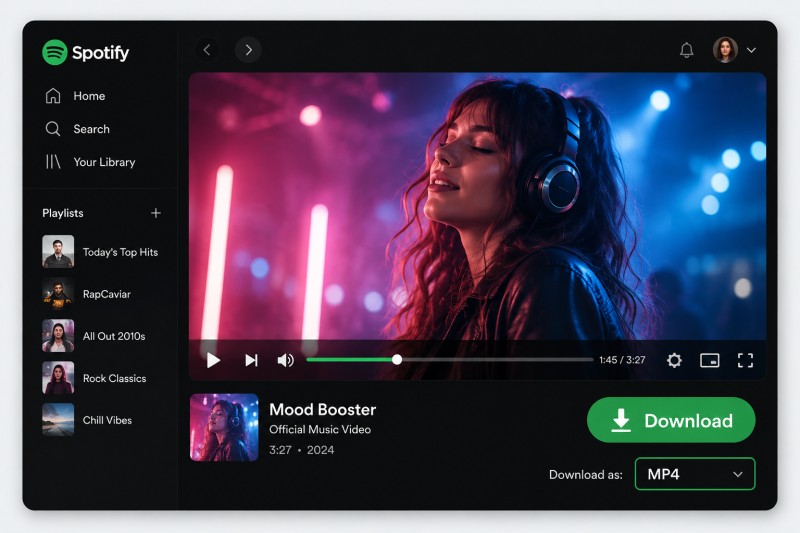
Part 1. Can You Download Videos from Spotify?
Yes, but the answer depends on the type of video content you're trying to save. Spotify offers several forms of video content, and its official download feature is primarily designed for offline playback within the Spotify app rather than saving videos as standalone files.
For example, Spotify Premium users can download supported music and video content for offline listening or viewing. However, these downloads remain inside the Spotify app and cannot normally be exported as MP4 files for use with other media players or devices.
If you want to download Spotify videos as MP4 files, you'll need a third-party tool that supports video downloading. The following sections introduce several options, starting with a dedicated Spotify downloader that provides more control over the output format and downloaded files.
Part 2. Download Spotify Videos to MP4 with Macsome Spotify Downloader
Macsome Spotify Downloader offers a convenient way to save supported Spotify video content as MP4 files for offline playback. Both Spotify Free and Premium accounts can be used with the supported video download feature. Instead of recording videos in real time, you can select the supported Spotify videos you want to download and save them directly to your computer. The software also supports batch downloading, making it easier to process multiple videos or other Spotify content at once.
In addition to video downloads, Macsome Spotify Downloader can batch-download Spotify tracks, albums, playlists, podcasts, and audiobooks and save audio in MP3, AAC, WAV, FLAC, AIFF, or ALAC formats. It can also preserve essential metadata such as title, artist, album, and artwork, helping keep your downloaded music library organized. With support for both Spotify video and audio content, the software provides a flexible solution for users who want to save and manage supported Spotify content locally for offline use.
Key Features of Macsome Spotify Video to MP4 Downloader
- Download supported Spotify videos as MP4 files with both Spotify Free and Premium accounts.
- Batch-download Spotify tracks, albums, playlists, podcasts, and audiobooks.
- Convert Spotify audio to MP3, AAC, WAV, FLAC, AIFF, and ALAC.
- Customize audio quality, bitrate, and sample rate according to your needs.
- Download playlists in batches with fast processing speeds.
- Preserve ID3 tags, including title, artist, album, and other metadata.
- Organize downloaded files with customizable filenames and output folders.
Download Spotify Music Videos to MP4 with Macsome Spotify Downloader
Step 1. Launch Macsome Spotify Downloader
Install and launch Macsome Spotify Downloader on your computer. The software provides both Spotify App Mode and Spotify Web Player Mode. Currently, the Spotify video download feature is only available in Spotify Web Player Mode. Select Web Player Mode to get started. This guide uses Spotify Web Player Mode as an example.
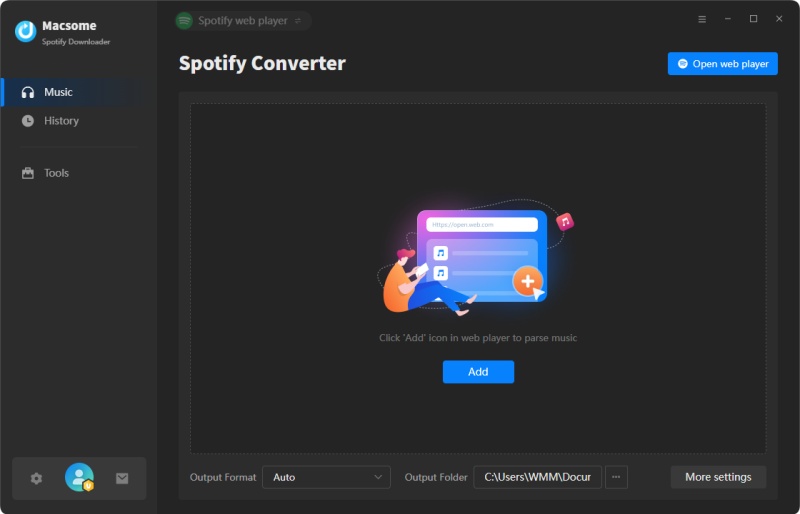
Step 2. Choose the Output Settings
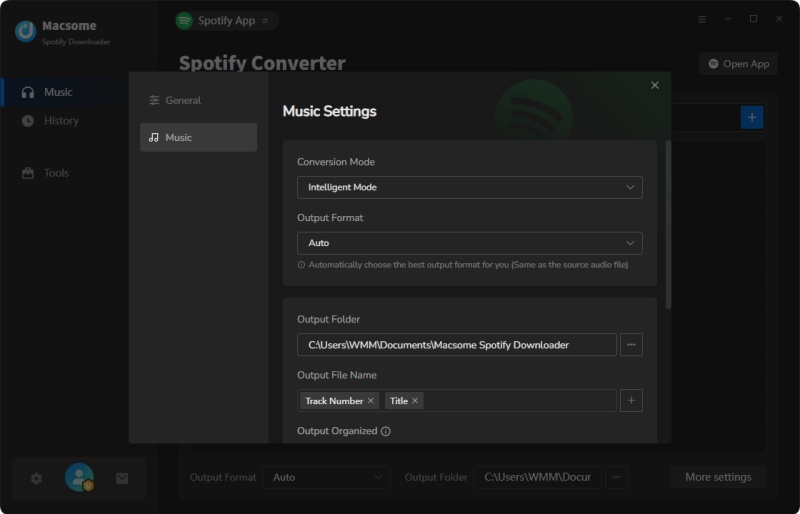
Click the Settings icon to customize your download preferences, including the audio output format, output quality, and destination folder. When downloading Spotify music videos, the video is saved in MP4 format, while you can choose the audio format for the accompanying audio track from the available options. You can also adjust the output quality and specify where the downloaded files are saved on your computer.
Step 3. Import Spotify Music Videos
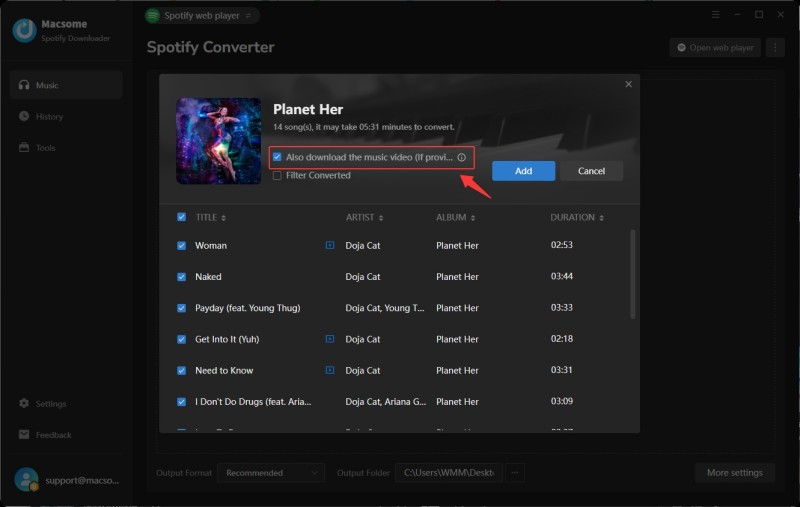
In the built-in Spotify Web Player, find the playlist or album containing the music videos you want to download. Click Click to add to load the available tracks into Macsome Spotify Downloader. To download the video along with the audio, make sure to select Also download the music video (If provided).
Step 4. Start Downloading Spotify Videos to MP4
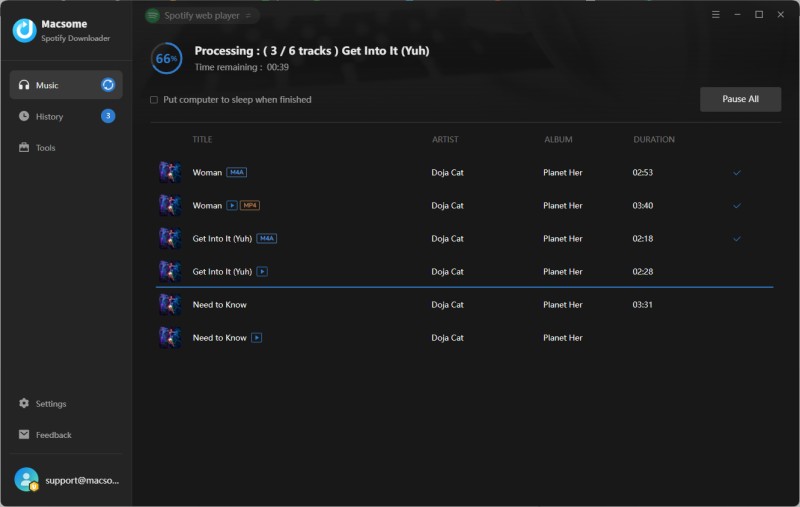
Click Convert to start downloading the selected Spotify music videos in batches. Once the download is complete, go to the History tab or click the Folder icon to quickly find the downloaded MP4 files on your computer.
If your goal is to save Spotify videos as files rather than simply listen to or watch them offline inside Spotify, a desktop downloader is generally more flexible.
Part 3. Download Spotify Video Podcasts with Spotify Premium
Spotify Premium includes an official download feature for offline playback, so you can enjoy supported content without an internet connection. For video content, this feature is mainly available for video podcasts. Full music videos generally cannot be downloaded for offline viewing through Spotify.
How to Download Spotify Video Podcasts
Follow these simple steps to download supported video podcast episodes in the Spotify mobile app:
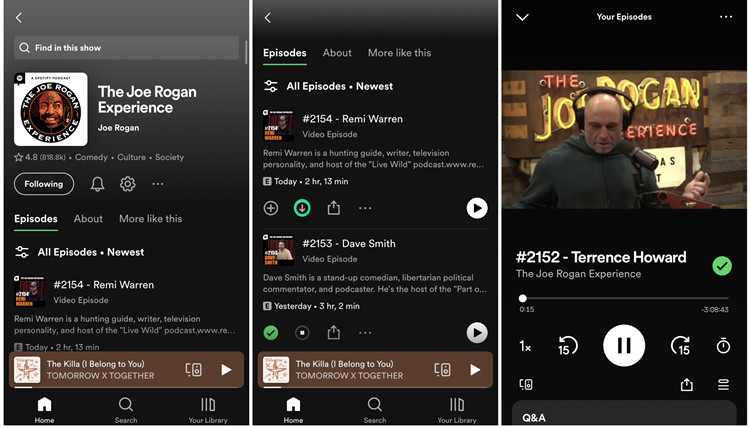
Step 1. Enable video downloads. Open Spotify and tap your profile picture. Go to Settings and privacy → Data-saving and offline, then turn off Download audio only if it is enabled.
Step 2. Download a video podcast. Search for a video podcast and open the show page. Select the episode you want to download and tap the Download button.
Step 3. Watch it offline. Once the download is complete, go to Your Library → Downloaded to find the episode and watch it offline in the Spotify app.
Part 4. Download Spotify Canvas Videos Online
Spotify Canvas is a short, looping visual that appears on the Now Playing screen while certain songs are playing in the Spotify mobile app. These short clips are different from full-length music videos and are usually only a few seconds long.
If you only need to save a Spotify Canvas, an online Canvas downloader can be a simple solution. Unlike desktop Spotify downloaders, these tools focus specifically on extracting the Canvas video associated with a supported Spotify track.
Canvas Downloader for Spotify
Canvas Downloader is an online tool designed specifically for downloading Spotify Canvas videos. It has a simple interface and does not require you to install additional software. To get started, copy the link to a Spotify track and paste it into the downloader.
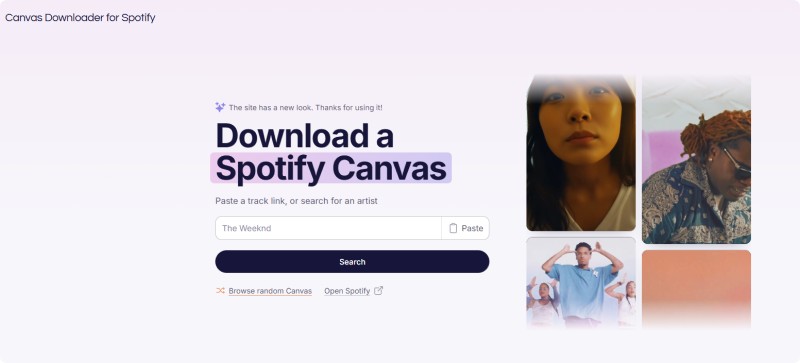
After processing the link, the tool will check whether a Canvas is available for the selected track. If a Canvas is found, you can download the available video and save it for offline use.
Part 5. FAQs About Downloading Spotify Videos
- Can I download music videos from Spotify?
- Yes, supported Spotify music videos can be downloaded with a compatible third-party tool such as Macsome Spotify Downloader. Spotify's built-in download feature is primarily designed for offline playback within the Spotify app and does not provide standalone MP4 files.
- Can I download Spotify videos as MP4 files?
- Yes. If the video is supported by the downloader you use, you can save it as an MP4 file. MP4 is a convenient format for playing downloaded videos with compatible media players outside the Spotify app.
- Can Spotify Premium download videos?
- Spotify Premium allows users to download supported content for offline playback. For video content, official downloads are mainly available for supported video podcasts. These downloads remain within the Spotify app and cannot be exported as MP4 files.
- Can I download Spotify Canvas videos?
- Yes. Spotify Canvas videos are short looping visuals associated with certain tracks. An online Spotify Canvas downloader can be used to save a Canvas when one is available for the selected track.
- What is the best way to download Spotify videos to MP4?
- If you want a standalone MP4 file rather than offline playback inside Spotify, a dedicated Spotify downloader is a more suitable option. Macsome Spotify Downloader supports downloading supported Spotify video content and saving it as MP4 files.
Conclusion
There are several ways to download Spotify video content, depending on the type of video and how you want to use it. Spotify Premium is suitable for watching supported video podcasts offline within the Spotify app, while an online tool such as Canvas Downloader can help save Spotify Canvas clips.
However, if you want to save supported Spotify music videos as standalone MP4 files, Macsome Spotify Downloader offers a more flexible solution. It also supports batch downloading Spotify music, podcasts, audiobooks, albums, and playlists in popular audio formats, making it easy to keep your favorite Spotify content available for offline use.
Take your favorite Spotify videos with you. Use Macsome Spotify Downloader to save supported music videos and other Spotify content directly to your computer.