



 Wyatt Maxwell
Spotify is one of the world's most popular music streaming platforms, offering millions of songs, playlists, and podcasts. However, offline listening is only available to Premium subscribers, who currently pay about $11 per month for the service. Due to this limitation, many users search for tools that can download Spotify music for offline listening. One tool frequently mentioned online is Spotdown, a free downloader that claims to convert Spotify songs, albums, and playlists into MP3 files with just a link. But does Spotdown really work? Is Spotdown safe to use? Are there better alternatives to Spotdown?
In this Spotdown review, we'll take a look at how the Spotdown downloader works, its main features, pros and cons, and potential safety concerns. We'll also introduce some of the best Spotdown alternatives for users who want a more stable way to download Spotify music in higher quality.
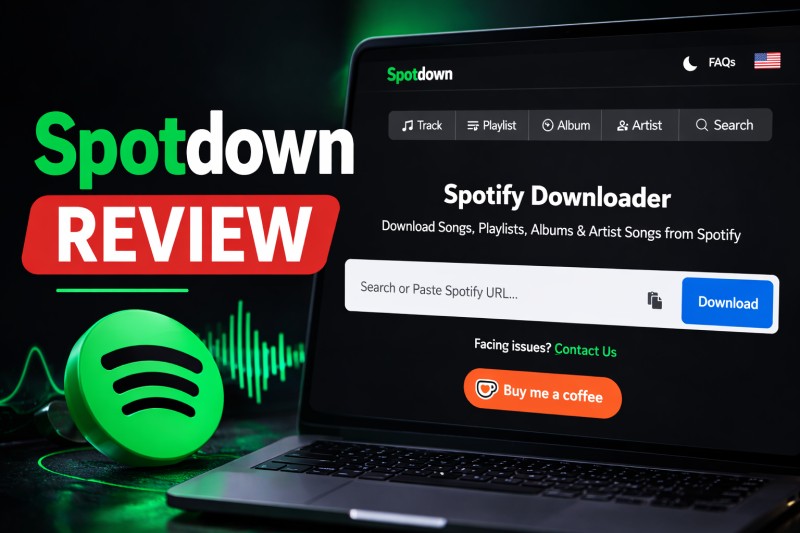
Part 1. What Is Spotdown
🌐 Spotdown Official Website: https://spotdown.org/
⭐ Recommendation Rating: ★★★★☆ 4.0/5
Spotdown is a popular free online tool that allows users to download music from Spotify, including songs, playlists, albums, and artist tracks, as MP3 files without requiring a Spotify Premium subscription.
This web-based Spotify downloader works by letting users paste a Spotify URL directly into the Spotdown website. Once the link is processed, the tool generates a downloadable audio file that can be saved to the device.
Since Spotdown runs entirely in a web browser, there is no need to install any software. It can be used on multiple platforms, including Windows, macOS, Android, iOS, and Linux, making it a convenient option for users who want to download Spotify music quickly.
Testing Note: During our testing, we found that downloading individual songs with Spotdown could trigger multiple redirects to unrelated pages, raising potential security concerns. The download speed was also relatively slow in some cases. Additionally, Spotdown does not support true batch downloads. Attempting to download playlists may redirect users to third-party premium tools. Some tracks failed to download even after several attempts.
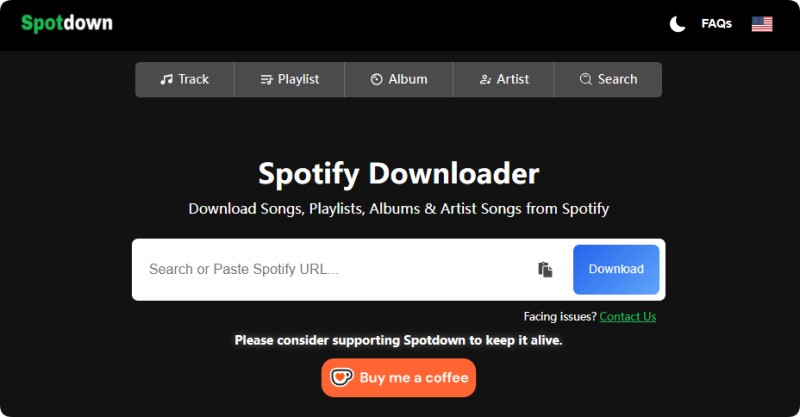
🔑 Key Features of Spotdown Spotify Downloader
- ✅ Download Spotify songs, albums, playlists, and artists for free.
- ✅ Supports downloading Spotify tracks to MP3 output with audio quality up to 320 kbps.
- ✅ Use the built-in search function to find and download tracks directly by entering a keyword.
- ✅ Allows downloading multiple tracks individually from playlists.
- ✅ Completely free with no download limits.
- ✅ Works on all devices through a web browser.
⚖️ Pros and Cons of Spotdown
Pros
- Free to use – Users can download Spotify tracks without paying or creating an account.
- No software installation required – Works entirely through a browser, making it convenient for quick downloads.
- Supports multiple Spotify content types – Can process songs, albums, playlists, and artists from Spotify.
- Simple and beginner-friendly interface – Users only need to paste a Spotify link to start downloading.
- Cross-platform access – Works on Windows, macOS, Android, iOS, and Linux via a web browser.
Cons
- Limited format options – Most downloads are available only in MP3.
- Audio quality may vary – The final file quality depends on the source and server processing.
- No batch management tools – Playlist downloads may require downloading tracks individually.
- Possible ads or pop-ups – This web-based downloader may include frequent ads and pop-ups.
- Metadata accuracy is not always guaranteed – Album art, artist name, or track details may occasionally be missing.
- Limited success rate – Some downloads may fail or produce 0 KB files.
Part 2. How to Use Spotdown to Download Spotify Songs
Using SpotDown is fairly straightforward. Check out the simple step-by-step guide below.
- Step 1. Launch the Spotify app or web player and locate the song, playlist, artist, or album you want to download. Click the three-dot menu (•••) next to the content and choose Share → Copy Link.
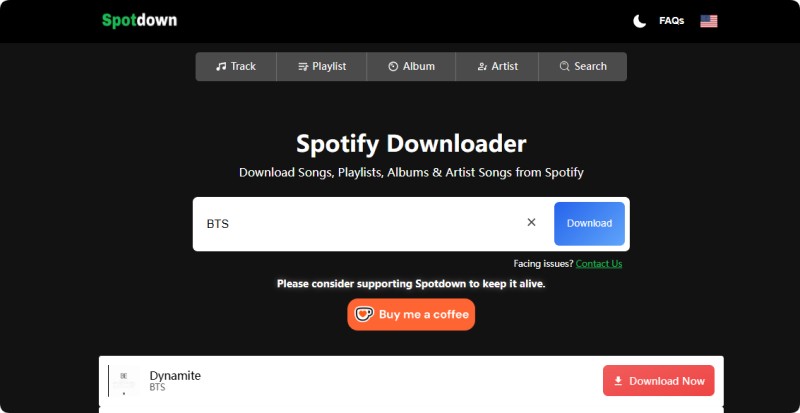
- Step 2. Open your browser and go to the official Spotdown website. Paste the copied Spotify link into the search or download box. Spotdown also includes a search feature: users can enter a song title, artist name, album, or keyword to find tracks directly.
- Step 3. After pasting the link, click Download. Spotdown will analyze the Spotify link and retrieve the available audio files.
- Step 4. If the link contains multiple tracks (such as a playlist or album), the tool will display a list of songs. Choose the track you want and click the Download Now button. You can save the downloaded tracks to your device.
⚠️ If you are downloading multiple tracks from a playlist on Spotify, it may take longer because web tools like Spotdown Spotify Downloader typically process songs individually.
Part 3. Is Spotdown Safe and Legit?
When using any online Spotify downloader, safety and legitimacy are essential considerations. Spotdown is a free web-based tool, but users should be aware of potential risks.
Is Spotdown Safe to Use?
Security Considerations: While Spotdown runs entirely in the browser and doesn’t require installation, there are some safety aspects to keep in mind:
- ✅ Browser-based: No installation needed, but downloading individual songs may trigger redirects to unrelated websites.
- ⚠️ Ads & Pop-ups: Only click the actual download link; avoid any other ads or pop-ups.
- 🔒 Privacy: The tool does not guarantee data protection. Using a VPN or private browsing is recommended.
- ⚠️ Download Reliability: Some tracks may fail or produce corrupted files; this is inconvenient but not harmful.
Is Spotdown Legal?
Legal Considerations: Downloading music from Spotify without permission may violate copyright rules. Key points to know:
- 📜 Spotify Terms: Downloading outside the official app or Premium offline feature breaches Spotify’s Terms of Service.
- ⚖️ Copyright Laws: Laws vary by country; using third-party downloaders may be illegal locally.
- ❌ Personal Use Only: Downloaded music should remain for personal offline listening; redistribution is prohibited.
Best Practices for Safe Use: Follow these tips to reduce risks while using Spotdown:
- 🌐 Always use the official website: https://spotdown.org/
- 🚫 Do not click on ads, pop-ups, or external download buttons.
- 🛡️ Use antivirus software and a VPN for extra protection.
- 🎧 Keep downloads for personal offline listening only; avoid sharing files.
In summary, Spotdown can be a convenient free tool for downloading Spotify music, but users should understand both the security and legal risks and follow best practices to stay safe.
Part 4. How to Fix If Spotdown Not Working (2026 Fix Guide)
Many users encounter issues when trying to download Spotify tracks with Spotdown. Common problems include slow downloads, redirects, missing tracks, or links not being recognized. Below are practical steps to help you fix these issues and get Spotdown working again.
Step 1: Check Your Spotify Link
Ensure the Spotify link is complete and valid. Copy the link directly from Spotify via Share → Copy Link. Spotdown only works with proper Spotify URLs starting with https://open.spotify.com/.
Step 2: Try a Different Browser or Clear Cache
Browser cache, cookies, or extensions can interfere with Spotdown. Try the following:
- Open Spotdown in an incognito/private browser window.
- Clear your browser cache and cookies.
- Temporarily disable ad-blockers or security extensions that might block redirects.
Step 3: Check Your Internet Connection and Regional Restrictions
Spotdown downloads may fail if your connection is unstable or if certain Spotify content is region-locked:
- Ensure you have a stable internet connection.
- Use a VPN if the content is restricted in your region.
Step 4: Update the Spotdown Website or Refresh Page
Spotdown may occasionally update its server settings. Refresh the page or ensure you are using the current official Spotdown URL.
Step 5: Consider Spotdown Alternatives
If Spotdown is still not working, you may want to try other Spotdown alternative tools. Popular options include SpotiDown, Spotdownloader, Soundloaders, and SpotifyMate. However, web-based tools often come with limitations such as unstable servers, slow download speeds, or limited audio quality.
For users who frequently download Spotify music, using a dedicated desktop downloader is usually a safer and more reliable solution.
Part 5. Best Spotdown Alternative – A Safer & More Reliable Spotify Downloader
Among desktop downloaders, Macsome Spotify Downloader stands out as a top choice. It allows you to download Spotify songs, albums, playlists, artists, podcasts, and audiobooks and convert them to MP3, AAC, WAV, AIFF, ALAC, or FLAC formats while preserving high audio quality. Macsome also keeps complete ID3 tags, including artwork, artist names, album details, and track metadata, keeping your music library perfectly organized.
With support for batch downloads, you can convert entire playlists or albums at once, saving time and effort. Even Spotify Free users can enjoy music offline anytime, anywhere, without compromising quality or convenience. With its stability, speed, and rich features, Macsome Spotify Downloader is one of the most reliable alternatives when online tools like Spotdown stop working.
Key Features of Macsome Spotify Downloader
- Download Spotify songs, playlists, podcasts, and audiobooks with high quality.
- Convert Spotify tracks to MP3, AAC, WAV, FLAC, AIFF, or ALAC.
- Supports both the Spotify desktop app and web player.
- Download without logging in on the web player.
- Customize output quality up to 320 kbps for high-fidelity audio.
- One-click CD burning & imports tracks to Apple Music.
- Play Spotify music offline with Free or Premium accounts.
- Batch download entire playlists or albums at up to 40x faster speed.
- Preserves all key ID3 tags, including artwork, artist, album, and track info.
How to Download Spotify Music to 320 kbps MP3 with Macsome
Step 1. Launch Macsome Spotify Downloader
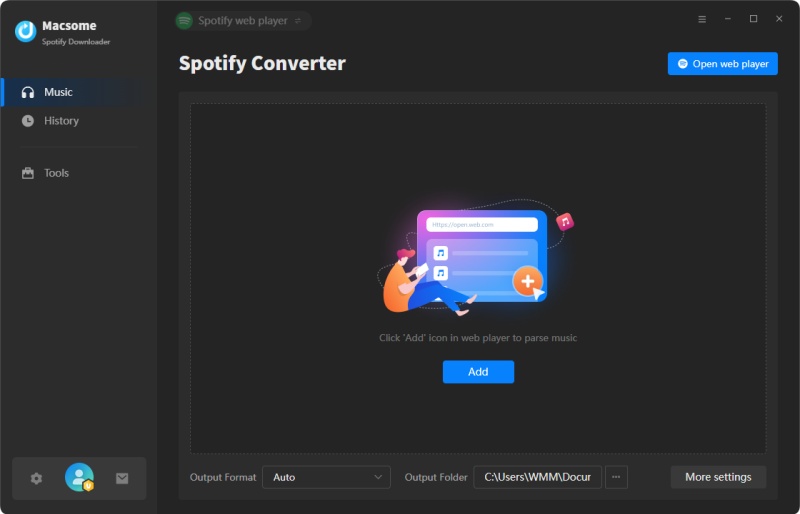
Install and launch Macsome Spotify Downloader on your computer. It supports both the Spotify desktop app and web player. We'll use the desktop app mode as an example. After selecting it, the Spotify app opens automatically. Sign in to access your library.
Step 2. Add Spotify Music to Macsome
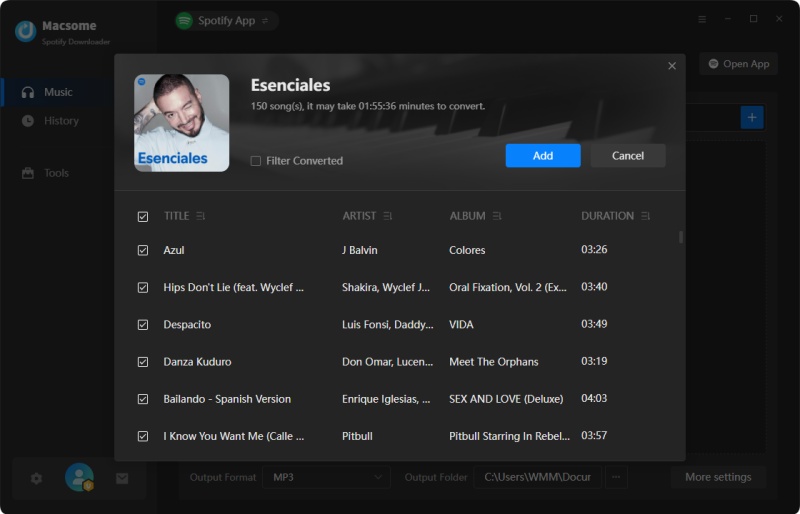
Open a playlist in the Spotify app, then click "Click to add" to load the tracks into Macsome. Click "Add" to include them in the conversion list. To download multiple playlists, click "Add More" and repeat the process.
Step 3. Set MP3 as Output Format
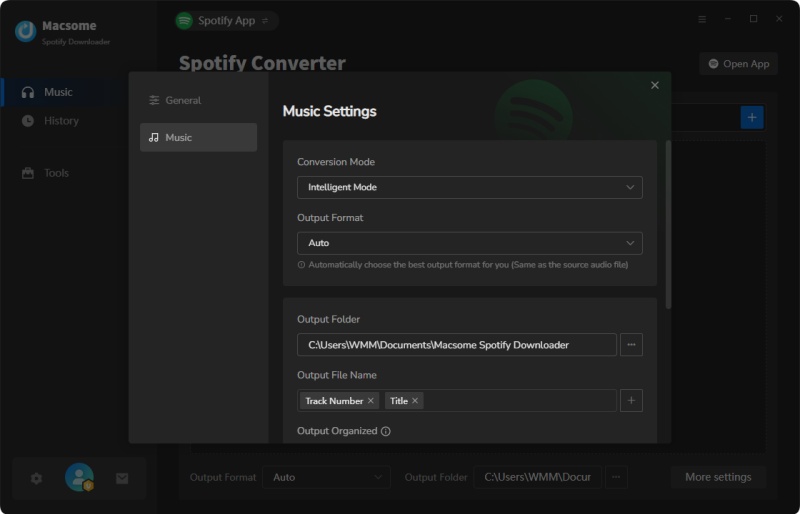
Click "Settings" in the lower left corner, then select MP3 as the output format. Other formats (AAC, WAV, FLAC, AIFF, ALAC) are also available. You can customize the bit rate (up to 320 kbps), output folder, file names, and organization for easier management.
Step 4. Start Downloading Spotify Music
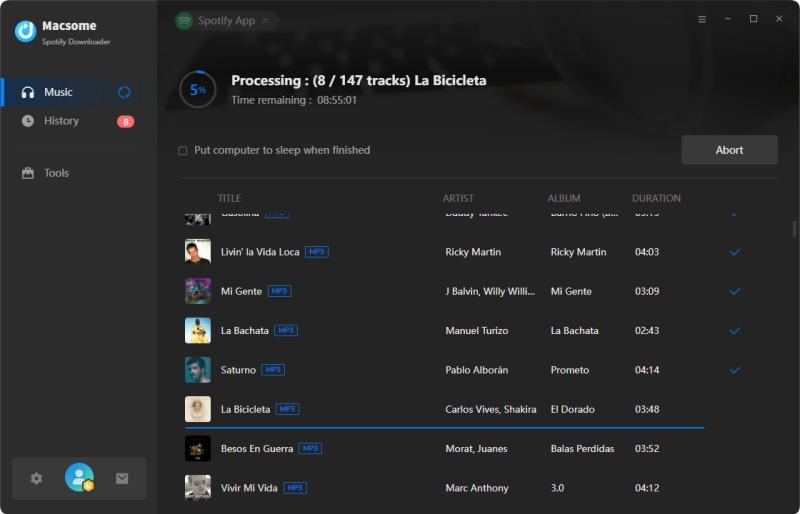
After configuring your settings, click "Convert" to start downloading. Once finished, check the "History" tab to view completed downloads. Click the "Folder" icon to locate your files. Now you can transfer Spotify MP3s to any device and enjoy offline listening anytime.
Part 6. FAQs About Spotdown Spotify Downloader
- Do I need a Spotify Premium account to use Spotdown?
- No. Spotdown works with both Free and Premium Spotify accounts. You can convert Spotify tracks, albums, or playlists to MP3 without logging in or subscribing to Premium.
- Can Spotdown download full playlists or albums?
- Spotdown supports playlist and album links, but free versions often limit downloads to a few tracks per album or playlist. Large playlists may need to be downloaded in segments. For batch downloads of full playlists or albums, desktop tools like Macsome Spotify Downloader are more efficient.
- Does Spotdown preserve ID3 tags and artwork?
- Spotdown provides basic MP3 files, but metadata such as ID3 tags, album artwork, track titles, and artist information may not always be preserved. For full metadata retention and organized music libraries, a dedicated downloader like Macsome Spotify Downloader is preferable.
- Which output formats does Spotdown support?
- Spotdown typically converts Spotify tracks to MP3 only. If you want other formats such as AAC, WAV, FLAC, AIFF, or ALAC, a desktop Spotify downloader like Macsome is necessary.
Conclusion
This concludes our Spotdown review.
Spotdown is a popular online Spotify downloader that quickly converts tracks, albums, and playlists to MP3 without requiring extra software. It works with both free and premium Spotify accounts, making it ideal for occasional downloads. However, as a web-based tool, Spotdown may be limited by server instability, slow download speeds, restrictions on large playlists, and missing metadata. These limitations may impact frequent users or those seeking high-quality audio.
For a more reliable and feature-rich experience, the Macsome Spotify Downloader is an excellent alternative. It supports the batch download of entire playlists and albums and offers multiple output formats, including MP3, AAC, WAV, FLAC, AIFF, and ALAC. It preserves audio quality up to 320 kbps and keeps all ID3 tags, including artwork, track information, and album details. Whether you are a Spotify Free or Premium user, Macsome ensures an organized, offline-ready music library.
Ready to take your Spotify music offline? Try Macsome Spotify Downloader today and start downloading Spotify playlists to high-quality MP3s effortlessly!