



 Belinda Raman
SoundCloud to WAV conversion is a useful option for listeners who want to save SoundCloud tracks in an uncompressed audio format for offline listening, audio editing, or music production. While SoundCloud makes it easy to stream and share music, the available audio quality and download options vary by track. WAV (Waveform Audio File Format) is a popular choice for users who need uncompressed audio files for professional audio workflows.
However, converting a SoundCloud track to WAV does not automatically improve its original audio quality. To save SoundCloud music as WAV files, you need a suitable downloader or converter that supports your preferred output format. In this guide, we'll explore two free SoundCloud to WAV converters, explain how they work, and compare their key features, pros, and cons to help you choose the right tool.
Part 1. Convert SoundCloud to WAV with Macsome SoundCloud to WAV Downloader
Macsome Music One is a professional SoundCloud to WAV Downloader that allows you to convert SoundCloud music to WAV without quality loss. Apart from WAV, Macsome Music One can also download SoundCloud tracks, albums, or playlists to MP3, FLAC, AAC, AIFF, and ALAC. This program is available to both SoundCloud free users and paid subscribers. After downloading, you will retain most of the ID3 tags and metadata information such as title, artist, playlist, album, etc.
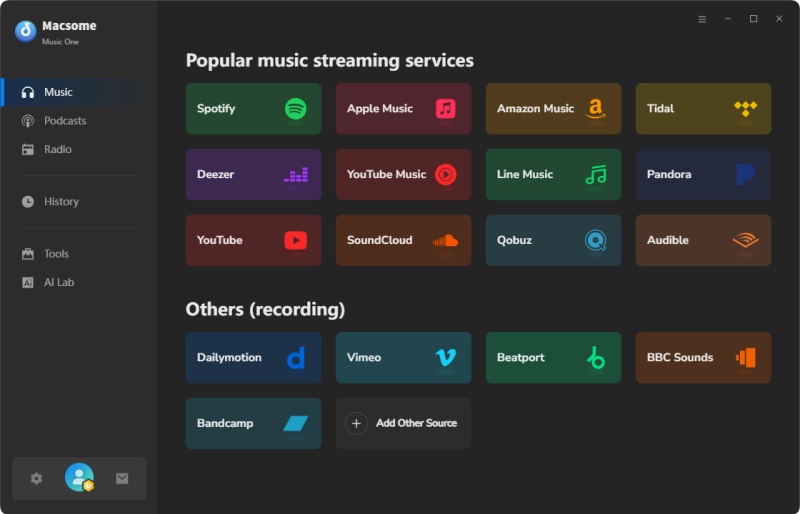
Macsome Music One is not merely a SoundCloud to WAV Converter, it is a multifunctional streaming music downloader. It can not only download music from Spotify, Apple Music, Tidal, Amazon Music, or other music streaming platforms but also record music from popular sites such as SoundCloud, YouTube, Qobuz, Dailymotion, Vimeo, etc. Macsome Music One also has Podcasts and Radio sections where you can listen to and download popular shows and episodes for free. What's more, it also includes several useful tools that let you convert local files simultaneously at high speed, edit song tags, remove vocals or instruments from audio files, and burn local music to CD. Macsome Music One is compatible with both Windows and Mac platforms. Download and install it on your computer to learn how to convert SoundCloud songs to WAV format for free.
How to Download SoundCloud Music to WAV with Macsome SoundCloud to WAV Downloader
Step 1. Open Macsome Music One on your computer, select the "SoundCloud" option in the Music tab, and the SoundCloud web player will start at the same time. Then log in to your SoundCloud account.
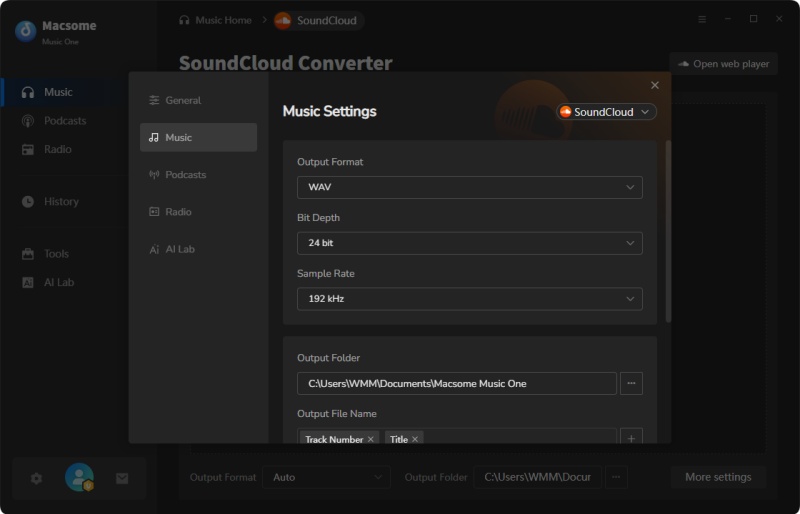
Step 2. Click the "More settings" button to open the settings window, you can set WAV as the output format and change the output folder to save the downloaded SoundCloud songs.
Step 3. Go to the SoundCloud web player, select the songs or playlists you wish to download from SoundCloud, whether it is free or not. Click on the "Click to add" button. Then, all the selected songs will be added to Macsome.
Step 4. Click on the "Convert" button to start download. After the download, you'll find the SoundCloud tracks saved to your local folder.
Pros:
- Convert SoundCloud music to WAV, MP3, FLAC, AIFF, AAC, or ALAC format.
- Record music from Qobuz, YouTube, Dailymotion, Vimeo, etc.
- Download music from music streaming services like Spotify, YouTube Music, etc.
- Keep original sound quality; conversion speed is up to 10X.
- Built-in useful tools, such as a free vocal remover, tag editor, etc.
Cons:
- Need to download.
Part 2. Free Online SoundCloud to WAV Converter - Soundcloudrips.com
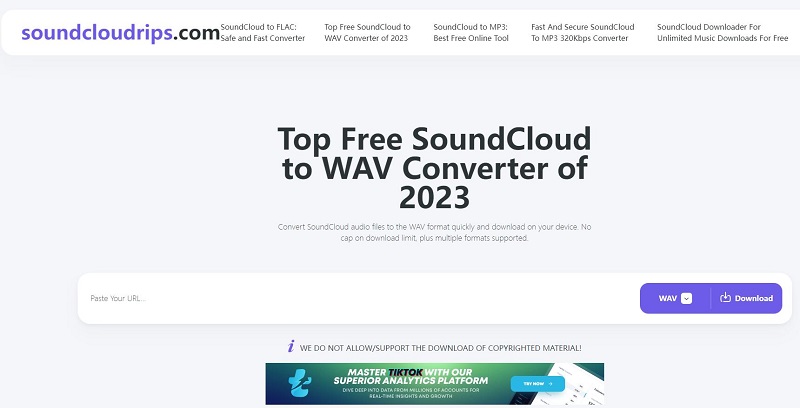
Soundcloudrips.com is a free and reliable online tool to convert unlimited SoundCloud files to WAV format quickly and download them on your device. The free tool also lets you convert music files from SoundCloud to WAV format for lossless downloads and high-quality output. You can also use this tool to download and convert videos from almost all popular websites, such as YouTube, Twitter, Facebook, OK.ru, TikTok, etc. There is no need to create an account or share your email ID. Soundcloudrips.com is compatible with Android, iOS, macOS, Windows, Linux, ChromeOS, Fire OS, and more.
Use Soundcloudrips.com for Safe SoundCloud to WAV Conversion:
Step 1. Go to the SoundCloud app and get the link/ URL to the audio file you wish to convert to WAV.
Step 2. Open the soundcloudrips.com website in your browser and paste the copied link on the tool's homepage.
Step 3. Select WAV as the output format from the drop-down menu and click on "Download." You might be directed to a new pop-up ad window. Just close it and do not install any extra software.
Step 4. Click the "Download to Your Device," and the file will be automatically saved to the local folder on your device.
Pros:
- Convert SoundCloud music to WAV, MP3, M4A, OGG, AAC, OPUS, ALAC, etc.
- Record music from YouTube, Twitter, Facebook, TikTok, etc.
- There is no need to install extra apps.
- Free and easy to use.
Cons:
- There are many ads on the interface and in the downloading process.
- It does not support batch conversion.
- It does not support selecting audio quality.
- Not reliable or 100% secure.
Part 3. Common Questions Related to Converting SoundCloud to WAV
1. Can I convert entire playlists from SoundCloud to WAV?
We have listed two SoundCloud to WAV Converters that can easily convert SoundCloud tracks to WAV. Macsome Music One lets you download SoundCloud playlists, albums, and tracks in batches. However, the free online SoundCloud to WAV converter from Soundcloudrips can only download a single track at a time.
2. Can free SoundCloud to WAV Converter maintain audio quality?
Macsome Music One can convert SoundCloud audio files without any data loss during the conversion process. However, the free online converter usually doesn't use high-quality algorithms and produces a lossy output.
3. Are there any limitations to using free SoundCloud to WAV Converter?
While the free SoundCloud to WAV Converter offers a convenient and budget-friendly option for users, it also presents certain limitations, such as file size restrictions or slower conversion speeds. And there are lots of ads and pop-ups on the free online site, which can make your computer unsafe. Macsome Music One is clean. Feel free to use it.
Summary
In this tutorial, you have learned about the top 2 feasible SoundCloud to WAV Converters for desktop and online. Soundcloudrips free online SoundCloud to WAV Converter is easy to use, just copy the link, and you can download tracks from SoundCloud to WAV on your computer. But this tool has too many ads and may attack your device. By comparison, Macsome Music One is a professional SoundCloud to WAV Converter that losslessly converts SoundCloud tracks to WAV, MP3, AAC, or other audio formats with high quality.