



 Belinda Raman
Looking for a way to download podcasts to MP3 for free? You're not alone.
As podcasts become more popular than ever, many users are looking for a simple way to save episodes as MP3 files for offline listening. Whether you're commuting, traveling, or trying to reduce mobile data usage, storing podcasts locally gives you full control over when and how you listen. But in practice, downloading podcasts to MP3 isn't always straightforward. Most platforms don't offer direct MP3 downloads due to content restrictions, while many free online tools come with ads, errors, or limited performance.
The good news is that with the right tool, you can easily download and convert podcasts to high-quality MP3 files without these limitations. In this guide, you'll discover the best ways to download podcasts to MP3 for free — including a faster, more reliable solution for long-term use.
Part 1. Why Download Podcasts to MP3?
Downloading podcasts to MP3 offers a more flexible and convenient way to enjoy your favorite content. Unlike streaming, MP3 files can be stored locally and played anytime without relying on an internet connection.
- Offline Listening: Whether you're on a flight, commuting, or in areas with poor network coverage, having podcasts saved as MP3s ensures uninterrupted playback.
- Device Compatibility: MP3 files are supported by almost all devices, including smartphones, MP3 players, USB drives, and car audio systems. This makes it easy to transfer and play podcasts anywhere.
- Build Customized Library: You can organize, back up, and manage your favorite podcasts without worrying about platform restrictions or content removal.
For users who want full control, better accessibility, and a smoother listening experience, downloading podcasts to MP3 is clearly the best choice — especially when using a reliable podcast downloader.
Part 2. Free Online Methods to Download Podcasts to MP3
For occasional downloads, free online podcast downloaders can be a quick and convenient solution. There are many free online tools available that allow users to convert podcasts to MP3 files without installing any software today.
Some popular options, such as PodcastToMP3, are known for their simplicity and relatively stable performance for basic conversions.
- Copy & Paste URLs: Simply copy the podcast episode link and paste it into the online downloader to convert it to an MP3 file.
- No Installation Required: These tools run entirely in your web browser, so you don't need to download or install any software.
- Quick for Single Episodes: Ideal for users who only want to download a few episodes occasionally.
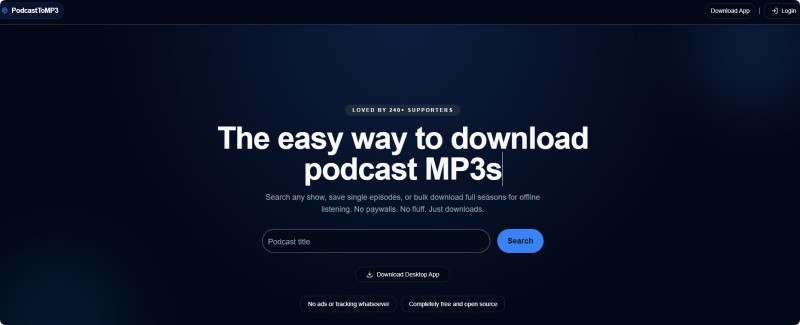
However, free online tools come with several drawbacks. They often suffer from slow processing speeds, frequent errors, low audio quality, and excessive ads or pop-ups. In addition, most of them cannot access major platforms like Spotify or Apple Podcasts, which limits the range of content you can download.
While these tools may work for quick, one-off tasks, they fall short when it comes to delivering high-quality, reliable, and hassle-free downloads—especially if you need to manage multiple podcast episodes efficiently.
As a result, many users turn to more powerful and stable solutions, which we will explore in the next section.
Part 3. The Best Way: Use a Reliable Podcast Downloader - Macsome Music One
Instead of relying on unstable online tools, a more effective solution is to use a dedicated podcast downloader that offers better performance and full control over your downloads. If you're looking for a reliable way to download podcasts to MP3, Macsome Music One is a powerful all-in-one tool worth trying.
It includes a free Podcast Downloader that allows you to download podcasts as MP3 files from over 10,000 podcast shows. With its built-in podcast directory, you can easily explore popular categories like technology, business, education, and entertainment. You can stream episodes instantly or download single episodes and entire series in batches for offline listening. Macsome Music One also automatically detects newly released episodes, so you never miss an update. All downloads are ad-free, require no registration, and are completely free—making it easy to build and manage your personal offline podcast library.
Additionally, it supports downloading podcasts from major platforms, including Spotify, Apple Podcasts, YouTube, and Amazon Music. As long as a podcast can be played on these streaming platforms, you can download it in multiple formats such as MP3, AAC, WAV, FLAC, AIFF, and ALAC, while preserving the original audio quality and ID3 tags.
Free Podcast Downloader for MP3
Download, convert, and manage podcasts in MP3 — fast, free, and without limits.
- 🎧 Discover and access 10,000+ podcasts in one place
- ⚡ Batch download episodes or full series instantly
- 📥 Save podcasts directly as high-quality MP3 files
- 🚀 Fast, stable, and ad-free experience
- 🔒 No account required – start downloading immediately
✔ 100% Free Podcast Downloader · ✔ No Ads · ✔ No Registration · ✔ Safe & Clean
How to Download Podcasts to MP3 with Macsome Music One
Downloading podcasts to MP3 with Macsome Music One is quick, simple, and requires no technical skills. Follow these steps:
Step 1. Launch Macsome Music One
Open Macsome Music One on your computer to get started.
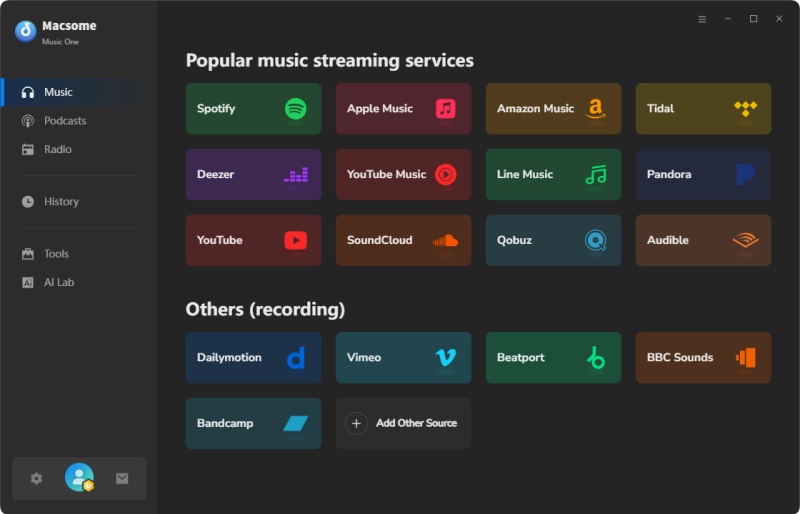
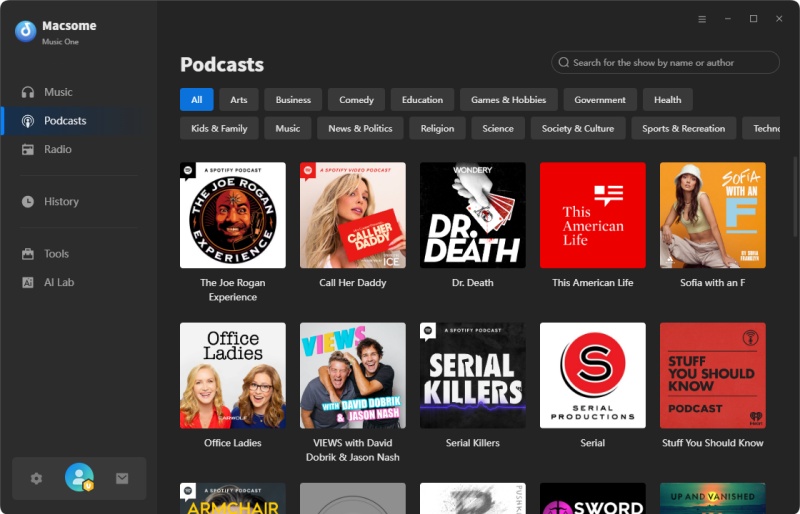
Step 2. Open the Podcast Library
Click the Podcasts tab on the left panel. Browse categories or search for your favorite shows.
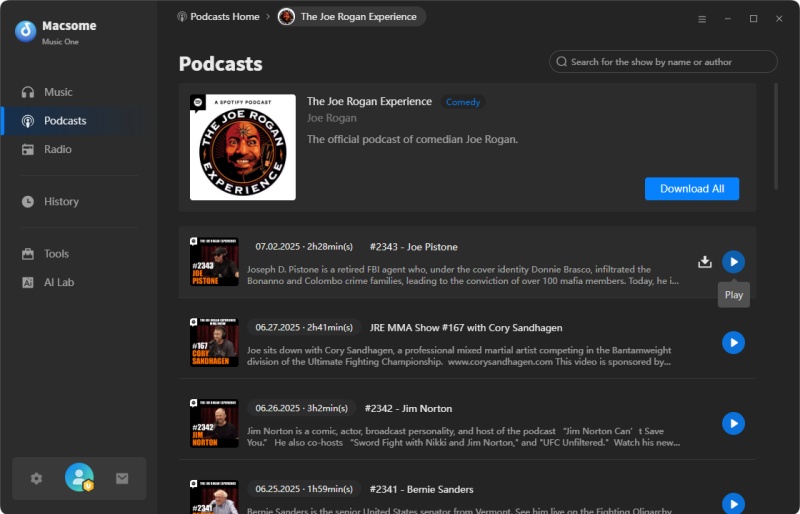
Step 3. Preview Podcast Episodes
Click a podcast cover to view all episodes. Use the Play button to preview any episode instantly.
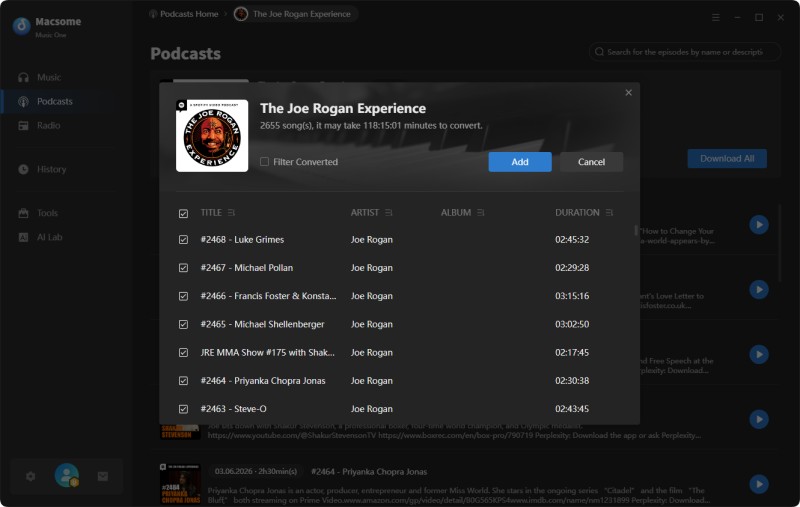
Step 4. Select Episodes to Download
Click the Download icon to save a single episode, or choose Download All to batch download podcasts to MP3.
Step 5. Add and Start Download Podcast to MP3
Click Add to queue episodes, then hit the Download button to start converting podcasts to MP3 files.
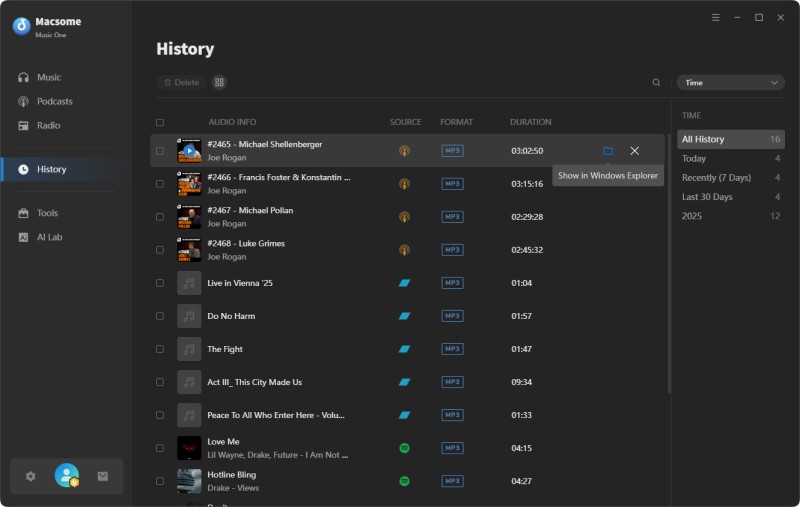
Step 6. Find Your Downloaded Podcasts
Once finished, go to History > Folder to locate your downloaded podcasts. Enjoy offline playback anytime, on any device.
💡 Tips for Faster Downloads
- Use Batch Download to save the entire podcast series at once.
- Preview episodes first to avoid downloading unwanted content.
- Organize downloaded podcasts into folders for easy offline access.
⚠️ Notes
- Ensure your internet connection is stable during batch downloads.
- Downloaded podcasts are saved as MP3 by default, keeping ID3 tags intact.
- No login or account is required—completely free and ad-free.
Part 4. FAQs of Downloading Podcasts to MP3
- Can I download any podcast to MP3 for free?
- Yes, using Macsome Music One, you can download podcasts from over 10,000 shows without any cost. Unlike online converters that limit platforms or add ads, Macsome allows you to save episodes as high-quality MP3 files directly to your computer for offline listening.
- Is it legal to download podcasts to MP3?
- Downloading podcasts for personal use is generally legal. Macsome Music One respects copyright rules—it lets you save episodes for offline playback, but does not bypass paid subscriptions or protected content. Always use downloaded podcasts for personal listening, not commercial redistribution.
- Why are some online podcast downloaders unreliable?
- Many free online tools suffer from slow processing, frequent errors, and limited platform support. They often can’t access services like Spotify or Apple Podcasts. Macsome Music One solves these problems by offering a dedicated, stable podcast downloader that supports multiple platforms, batch downloads, and preserves MP3 audio quality.
- Can I download the entire podcast series in one click?
- Yes! Macsome Music One includes a batch download feature that lets you save a full podcast series to MP3 at once. You can also schedule downloads or let the app automatically detect new episodes so you never miss the latest content.
- Which platforms does Macsome Music One support?
- Macsome Music One supports major streaming services, including Spotify, Apple Podcasts, YouTube, Amazon Music, and more. You can save episodes as MP3, AAC, WAV, FLAC, AIFF, or ALAC with ID3 tags preserved, making it easy to organize your offline podcast library.
Conclusion: Ready to Download Podcasts to MP3?
Whether you want to listen offline, organize your favorite shows, or enjoy podcasts on any device, Macsome Music One offers the easiest, fastest, and most reliable solution to download podcasts to MP3 for free. With support for over 10,000 podcast shows, batch downloads, and an ad-free experience, you can take full control of your podcast library without any limitations. If you use streaming services frequently, Macsome Music One also allows you to download podcasts from Spotify, YouTube, Amazon Music, Apple Podcasts, and more in multiple formats, including MP3, AAC, WAV, FLAC, AIFF, and ALAC.
Stop relying on unreliable, free online tools. Start building your personal podcast collection today with Macsome Music One. There's no registration, cost, or interruptions.